 kiritohyugen
Goma Gateway - simple lightweight API Gateway Management.
   _____
  / ____|
 | |  __  ___  _ __ ___   __ _
 | | |_ |/ _ \| '_ ` _ \ / _` |
 | |__| | (_) | | | | | | (_| |
  \_____|\___/|_| |_| |_|\__,_|
Goma Gateway is a lightweight API Gateway Management.






Architecture:
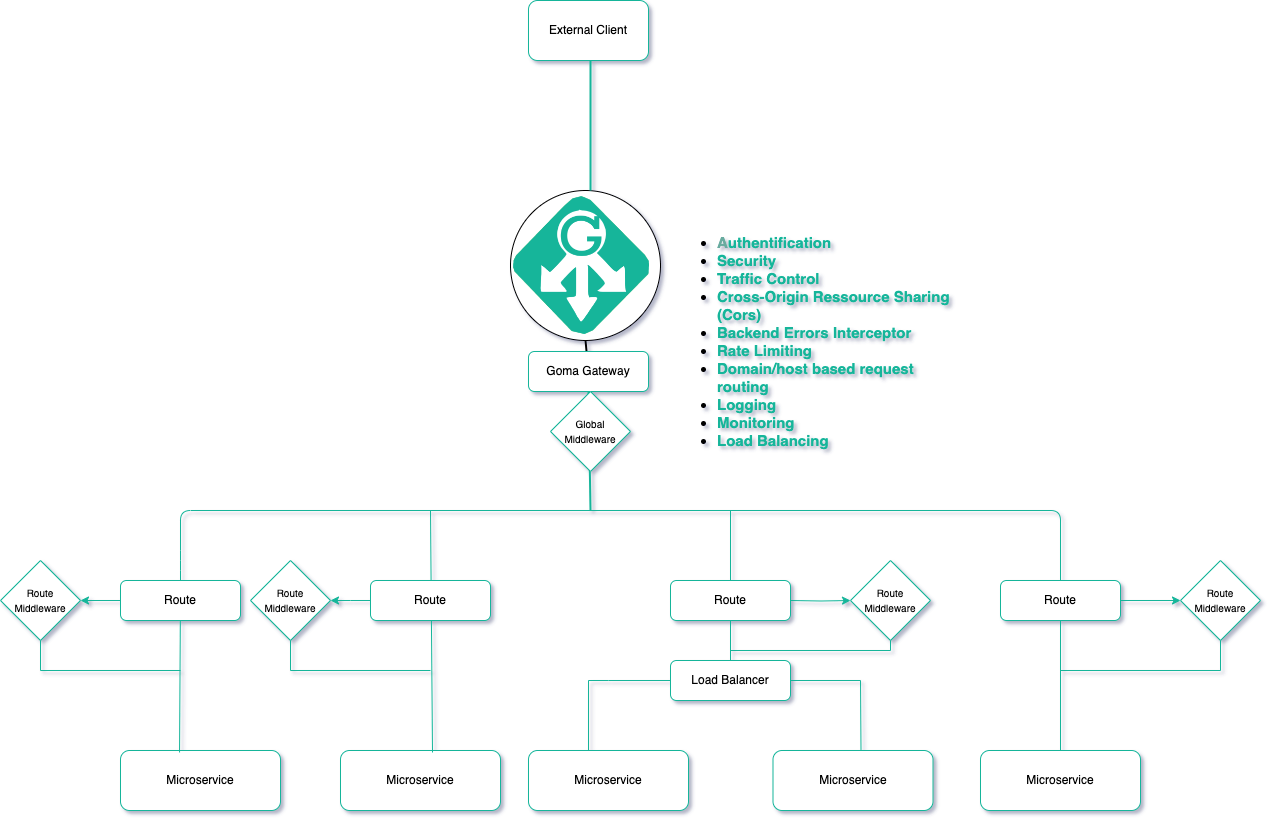
Links:
Documentation is found at https://jkaninda.github.io/goma-gateway
Features
It comes with a lot of integrated features, such as:
- RESTFull API Gateway management
- Domain/host based request routing
- Multi domain request routing
- Reverse Proxy
- Websocket Proxy
- Cross-Origin Resource Sharing (CORS)
- Custom Headers
- Backend Errors interceptor
- Authentication middleware
- JWT
client authorization based on the result of a request - Basic-Auth
- JWT
- Rate limiting
- In-Memory Token Bucket based
- In-Memory client IP based
Todo:
- Support TLS
- Blocklist IP address middleware
- OAuth authentication middleware — Optional
- Distributed Rate Limiting for Token based across multiple instances using Redis
- Distributed Rate Limiting for In-Memory client IP based across multiple instances using Redis
Usage
1. Initialize configuration
You can generate the configuration file using config init --output /config/config.yml command.
The default configuration is automatically generated if any configuration file is not provided, and is available at /config/goma.yml
docker run --rm  --name goma-gateway \
 -v "${PWD}/config:/config" \
 jkaninda/goma-gateway config init --output /config/goma.yml
2. Run server
docker run --rm --name goma-gateway \
 -v "${PWD}/config:/config" \
 -p 80:80 \
 jkaninda/goma-gateway server
3. Start server with a custom config
docker run --rm --name goma-gateway \
 -v "${PWD}/config:/config" \
 -p 80:80 \
 jkaninda/goma-gateway server --config /config/config.yml
4. Healthcheck
- Goma Gateway readiness:
/readyz - Routes health check:
/healthz
5. Simple deployment in docker compose file
services:
  goma-gateway:
    image: jkaninda/goma-gateway
    command: server
    healthcheck:
      test: curl -f http://localhost/readyz || exit 1
      interval: 30s
      retries: 5
      start_period: 20s
      timeout: 10s
    ports:
      - "80:80"
    volumes:
      - ./config:/config/
Create a config file in this format
Customize configuration file
Example of a configuration file
# Goma Gateway configurations
gateway:
  ########## Global settings
  listenAddr: 0.0.0.0:80
  # Proxy write timeout
  writeTimeout: 15
  # Proxy read timeout
  readTimeout: 15
  # Proxy idle timeout
  idleTimeout: 60
  # Proxy rate limit, it's In-Memory IP based
  # Distributed Rate Limiting for Token based across multiple instances is not yet integrated
  rateLimiter: 0
  accessLog:    "/dev/Stdout"
  errorLog:     "/dev/stderr"
  ## Enable, disable routes health check
  disableHealthCheckStatus: false
  ## Returns backend route healthcheck errors
  disableRouteHealthCheckError: false
  # Disable display routes on start
  disableDisplayRouteOnStart: false
  # disableKeepAlive allows enabling and disabling KeepALive server
  disableKeepAlive: false
  # interceptErrors intercepts backend errors based on defined the status codes
  interceptErrors:
    - 405
    - 500
  # - 400
  # Proxy Global HTTP Cors
  cors:
    # Global routes cors for all routes
    origins:
      - http://localhost:8080
      - https://example.com
    # Global routes cors headers for all routes
    headers:
      Access-Control-Allow-Headers: 'Origin, Authorization, Accept, Content-Type, Access-Control-Allow-Headers, X-Client-Id, X-Session-Id'
      Access-Control-Allow-Credentials: 'true'
      Access-Control-Max-Age: 1728000
  ##### Define routes
  routes:
    # Example of a route | 1
    - name: Public
      # host Domain/host based request routing
      host: "" # Host is optional
      path: /public
      ## Rewrite a request path
      # e.g rewrite: /store to /
      rewrite: /
      destination:  https://example.com
      #DisableHeaderXForward Disable X-forwarded header.
      # [X-Forwarded-Host, X-Forwarded-For, Host, Scheme ]
      # It will not match the backend route, by default, it's disabled
      disableHeaderXForward: false
      # Internal health check
      healthCheck: '' #/internal/health/ready
      # Route Cors, global cors will be overridden by route
      cors:
        # Route Origins Cors, route will override global cors origins
        origins:
          - https://dev.example.com
          - http://localhost:3000
          - https://example.com
        # Route Cors headers, route will override global cors headers
        headers:
          Access-Control-Allow-Methods: 'GET'
          Access-Control-Allow-Headers: 'Origin, Authorization, Accept, Content-Type, Access-Control-Allow-Headers, X-Client-Id, X-Session-Id'
          Access-Control-Allow-Credentials: 'true'
          Access-Control-Max-Age: 1728000
      ##### Apply middlewares to the route
      ## The name must be unique
      ## List of middleware name
      middlewares:
        - api-forbidden-paths
    # Example of a route | 2
    - name: Basic auth
      path: /protected
      rewrite: /
      destination:  https://example.com
      healthCheck:
      cors: {}
      middlewares:
        - api-forbidden-paths
        - basic-auth

#Defines proxy middlewares
# middleware name must be unique
middlewares:
  # Enable Basic auth authorization based
  - name: basic-auth
    # Authentication types | jwt, basic, OAuth
    type: basic
    paths:
      - /user
      - /admin
      - /account
    rule:
      username: admin
      password: admin
  #Enables JWT authorization based on the result of a request and continues the request.
  - name: google-auth
    # Authentication types | jwt, basic, OAuth
    # jwt authorization based on the result of backend's response and continue the request when the client is authorized
    type: jwt
    # Paths to protect
    paths:
      - /protected-access
      - /example-of-jwt
      #- /* or wildcard path
    rule:
      # This is an example URL
      url: https://www.googleapis.com/auth/userinfo.email
      # Required headers, if not present in the request, the proxy will return 403
      requiredHeaders:
        - Authorization
    #  You can also get headers from the authentication request result and inject them into the next request header or params.
    #  In case you want to get headers from the authentication service and inject them into the next request headers.
    #  Set the request variable to the given value after the authorization request completes.
    # In case you want to get headers from the authentication service and inject them into the next request headers.
    #  Key is authentication request response header Key. Value is the next Request header Key.
    headers:
      userId: Auth-UserId
      userCountryId: Auth-UserCountryId
    # In case you want to get headers from the Authentication service and inject them to the next request params.
    #Key is authentication request response header Key. Value is the next Request parameter Key.
    params:
      userCountryId: countryId
  # The server will return 403
  - name: api-forbidden-paths
    type: access
    ## prevents access paths
    paths:
      - /swagger-ui/*
      - /v2/swagger-ui/*
      - /api-docs/*
      - /internal/*
      - /actuator/*
Requirement
- Docker
Contributing
The Goma Gateway project welcomes all contributors. We appreciate your help!
Give a Star! ⭐
If you like or are using Goma Gateway, please give it a star. Thanks!
License
This project is licensed under the Apache 2.0 License. See the LICENSE file for details.
Copyright
Copyright (c) 2024 Jonas Kaninda