 Jonas Kaninda
Goma Gateway - simple Lightweight High-Performance API Gateway Management.
   _____
  / ____|
 | |  __  ___  _ __ ___   __ _
 | | |_ |/ _ \| '_ ` _ \ / _` |
 | |__| | (_) | | | | | | (_| |
  \_____|\___/|_| |_| |_|\__,_|
Goma Gateway is a lightweight High-Performance API Gateway Management.






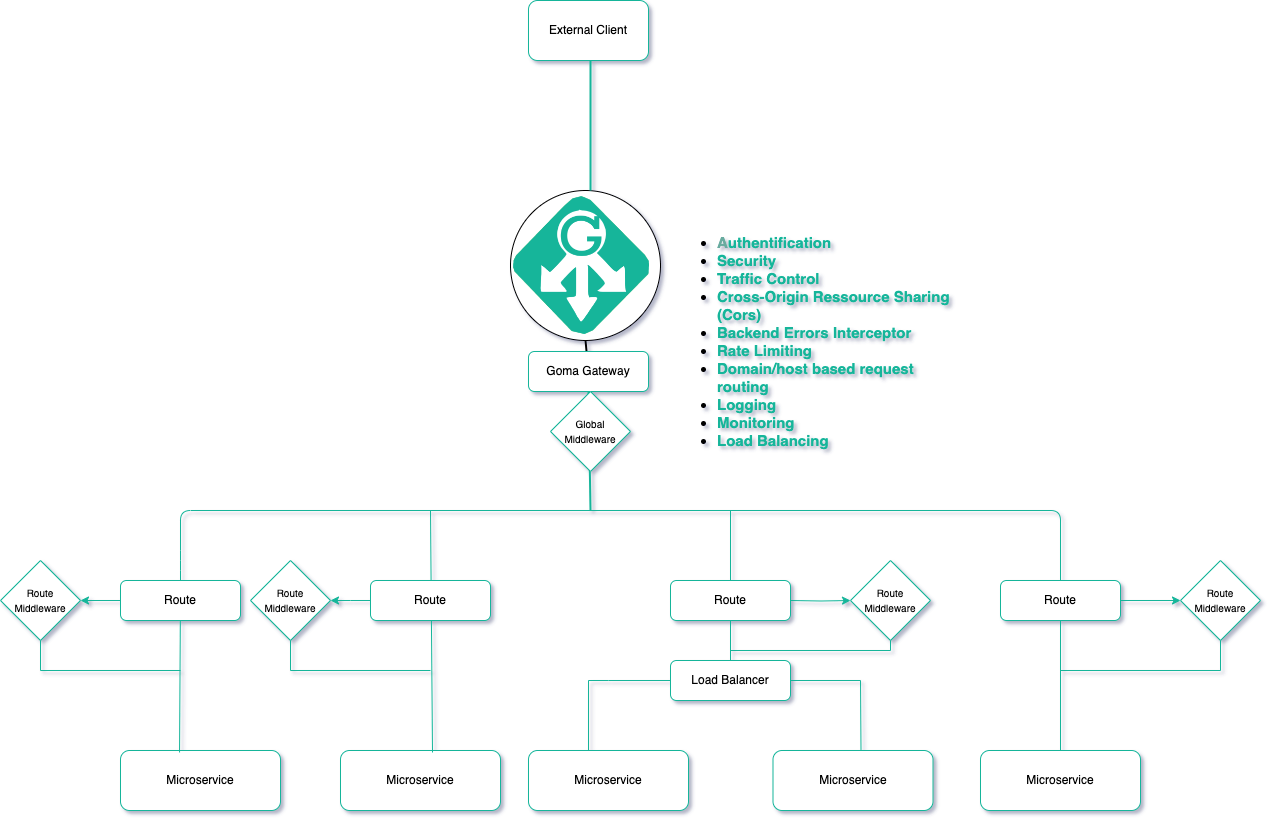
Architecture:
Links:
Documentation is found at https://jkaninda.github.io/goma-gateway
Features
It's designed to be straightforward and efficient, offering a rich set of features, including:
Core Features
-
RESTful API Gateway Management
Simplify the management of your API Gateway with powerful tools. -
Domain/Host-Based Request Routing
Route requests based on specific domains or hosts. -
Multi-Domain Request Routing
Handle requests across multiple domains seamlessly. -
Reverse Proxy
Efficiently forward client requests to backend servers. -
WebSocket Proxy
Enable real-time communication via WebSocket support.
Security and Control
-
Cross-Origin Resource Sharing (CORS)
Define and manage cross-origin policies for secure interactions. -
Custom Headers
Add and modify headers to meet specific requirements. -
Backend Errors Interceptor
Catch and handle backend errors effectively. -
Block Common Exploits Middleware
- Detect patterns indicating SQL injection attempts.
- Identify basic cross-site scripting (XSS) attempts.
-
Authentication Middleware
- Support for JWT with client authorization based on request results.
- Basic-Auth and OAuth authentication mechanisms.
Monitoring and Performance
-
Logging
Comprehensive request and response logging. -
Metrics
Gather insights and monitor performance metrics. -
Rate Limiting
- In-Memory Rate Limiting: Client IP-based request throttling.
- Distributed Rate Limiting: Leverage Redis for scalable, client IP-based rate limits.
-
Load Balancing
Use a round-robin algorithm for efficient load distribution.
Configuration and Flexibility
-
Support for Multiple Route Configuration Files
Organize routes across multiple.ymlor.yamlfiles. -
TLS Support
Ensure secure communication with TLS integration. -
HTTP Method Restrictions
Limit HTTP methods for specific routes to enhance control.
Define your routes and middleware directly in code for seamless configuration.
Usage
1. Initialize configuration
You can generate the configuration file using config init --output /etc/goma/config.yml command.
The default configuration is automatically generated if any configuration file is not provided, and is available at /etc/goma/goma.yml
docker run --rm  --name goma-gateway \
 -v "${PWD}/config:/etc/goma/" \
 jkaninda/goma-gateway config init --output /etc/goma/goma.yml
2. Check configuration
docker run --rm --name goma-gateway \
 -v "${PWD}/config:/etc/goma/" \
 -p 8080:8080 \
 jkaninda/goma-gateway config check --config /etc/goma/config.yml
3. Run server
docker run --rm --name goma-gateway \
 -v "${PWD}/config:/etc/goma/" \
 -p 8080:8080 \
 jkaninda/goma-gateway server
4. Start server with a custom config
docker run --rm --name goma-gateway \
 -v "${PWD}/config:/etc/goma/" \
 -p 8080:8080 \
 -p 8443:8443 \
 jkaninda/goma-gateway server --config /etc/goma/config.yml
4. Healthcheck
- Goma Gateway health check:
/health/live - Routes health check:
/health/routes
5. Simple deployment in docker compose file
services:
  goma-gateway:
    image: jkaninda/goma-gateway
    command: server
    ports:
      - "8080:8080"
    volumes:
      - ./config:/etc/goma/
Supported Systems
- Linux
- MacOS
- Windows
Please download the binary from the release page.
Init configs:
./goma config init --output config.yml
To run
./goma server --config config.yml
Deployment
- Docker
- Kubernetes
Contributing
The Goma Gateway project welcomes all contributors. We appreciate your help!
Give a Star! ⭐
If you like or are using Goma Gateway, please give it a star. Thanks!
Please share.
License
This project is licensed under the Apache 2.0 License. See the LICENSE file for details.
Copyright
Copyright (c) 2024 Jonas Kaninda